
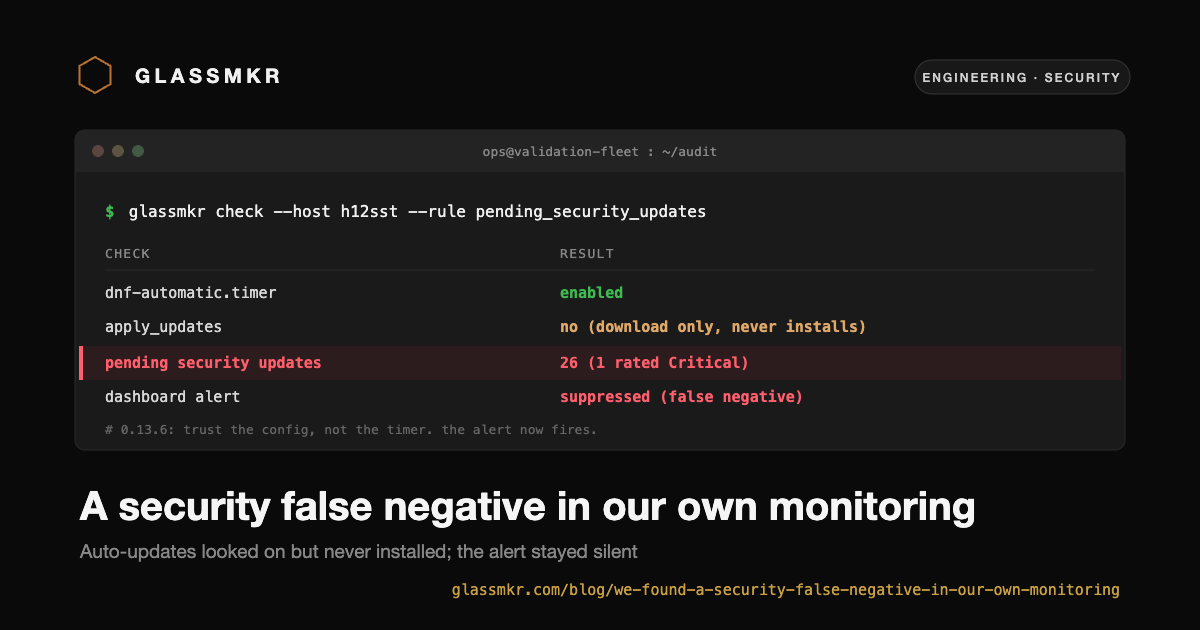
We found a security false-negative in our own monitoring. Here is exactly what it was.
The worst failure mode for a monitoring tool is not a noisy false alarm. It is the alert that stays quiet while something is actually wrong. We found one of those in our own product, caught it by running Glassmkr against our own fleet, fixed it, and we are telling you about it because that is the only honest thing to do.
The bug
On RHEL-family hosts (Rocky, AlmaLinux, RHEL, CentOS, Fedora), Crucible has a check that asks "are automatic security updates configured?" If the answer is yes, the dashboard suppresses the pending_security_updates alert, on the reasoning that a host applying its own patches does not need to be nagged about pending ones.
The check was wrong on one specific configuration. dnf-automatic ships with a download-only mode: the timer runs, it downloads updates, and it never installs them unless apply_updates = yes is set in /etc/dnf/automatic.conf. Our detector saw the timer enabled and reported "auto-updates configured: true." So on a host that was downloading security patches and never applying them, we suppressed the very alert that should have been screaming.
The result: a host could sit with pending Critical-rated security updates, indefinitely unapplied, and the dashboard would show it as fine.
Why it happened
The Debian code path got it right and the RHEL path did not, for a specific reason. The Debian/Ubuntu side of the same check inspected the actual contents of the unattended-upgrades config to decide "configured." The RHEL side trusted the timer-enabled state alone and never read the config. Two code paths, two standards.
The underlying trap is that dnf-automatic has a download-versus-install split that unattended-upgrades does not. There is no Debian equivalent of "the updater is running but deliberately not applying anything." So the RHEL path modeled a world that does not have a download-only mode, and download-only is exactly the mode that bites you.
How we caught it
We run Crucible on our own validation fleet. During a structured validation campaign we walked every alert rule on real hardware, and one of the RHEL hosts (Rocky 9.6, with a download-only dnf-automatic timer) had 26 pending updates including one rated Critical. The pending_security_updates alert was not firing. That silence was the bug. A monitoring tool that goes quiet in the presence of unapplied Critical patches has failed at its one job.
This is the entire argument for dogfooding. We did not find this from a customer ticket or a CVE write-up; we found it by pointing our own product at our own machines.
The fix
Crucible 0.13.6 makes the RHEL path as config-aware as the Debian path. It now reports auto-updates as configured only when one of two things is true:
dnf-automatic-install.timeris enabled (that timer applies updates unconditionally), or- a legacy or download timer is enabled and
apply_updates = yesin/etc/dnf/automatic.conf.
Otherwise it reports "not configured" with a reason, which un-suppresses pending_security_updates. We validated the fix end to end: on the affected host, after upgrading to 0.13.6, the alert fired on the very first collection cycle, correctly, on the patches that had been sitting there the whole time.
Debian and Ubuntu hosts were never affected. That path already read the config.
What you should do
If you run RHEL-family hosts with dnf-automatic, upgrade the agent:
sudo npm install -g @glassmkr/crucible@latest
sudo systemctl restart glassmkr-crucible
If you want to check whether you were in the affected state, look for a dnf-automatic.timer enabled with apply_updates = no in /etc/dnf/automatic.conf. That is the download-only configuration: patches arriving, nothing installing them. 0.13.6 will now tell you.
The principle
We would rather publish our own false-negative than let you discover it. A monitoring tool earns trust by failing loudly, and the failures it must never have are the silent ones. We found a silent one, we fixed it, and we are writing it down in public because a vendor that hides its own near-misses is not a vendor you should trust to watch your infrastructure.
If you want to read the alert rules and what each one checks, they are public at /docs/rules. The changelog entry for this fix is at /docs/changelog.